Collections Settings
The Collections settings tab configures how albums, folders, moments, calendar months, and places behave: whether they can be downloaded as ZIP archives, which files such an archive contains, and the sort order that newly created collections start with.
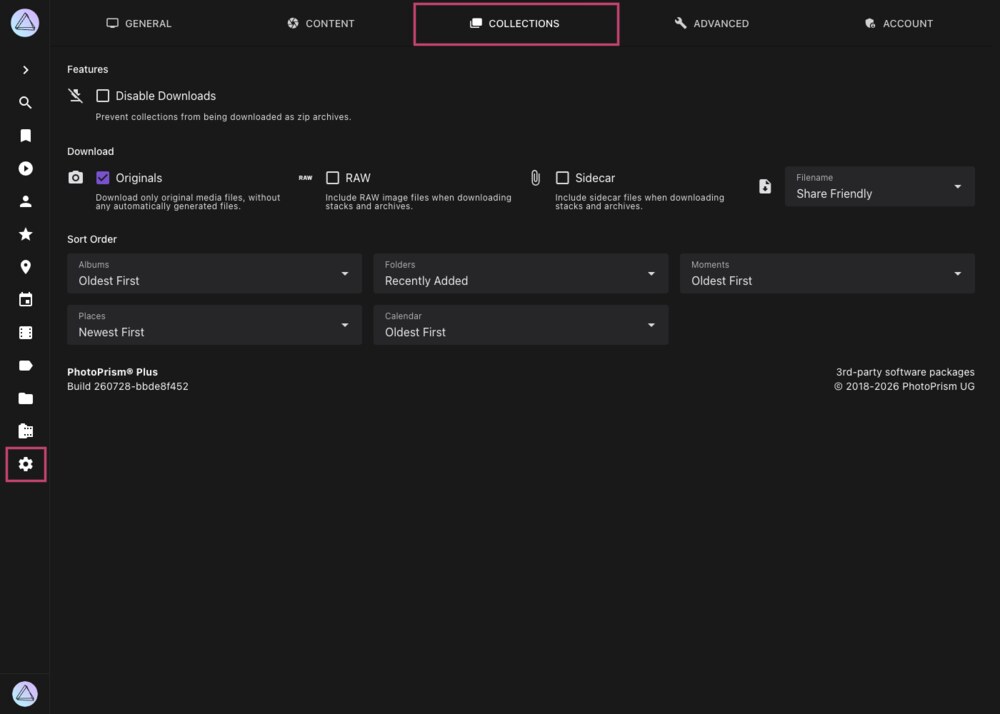
This tab is only shown to super admins. The Download options additionally require the Download feature to be enabled in the General settings tab.
Features
Disable Downloads
Prevents entire collections from being downloaded as ZIP archives, for example through the download button on an album. Individual pictures can still be downloaded as long as the Download feature is enabled.
Download
These options determine which files are added to a ZIP archive when a whole collection is downloaded. They are only shown when downloads have not been disabled above.
Originals
Only files in the originals folder are included, not the automatically generated files in the sidecar folder. This is the recommended default. Preview images that PhotoPrism generated from a video are not added to a download, except as part of a Live Photo.
RAW
Includes RAW image files. Since a RAW file is typically much larger than the JPEG rendered from it, enabling this option can increase the size of an archive considerably.
Sidecar
Includes sidecar files such as XMP metadata. This is generally not recommended except for specific professional workflows.
Filename
Determines how the files inside the archive are named:
| Option | Filenames |
|---|---|
| Current Name | The name the file currently has in your library |
| Original Name | The name the file had when it was uploaded or imported, falling back to the current name |
| Share Friendly | A normalized name composed of the capture time and the picture title, e.g. 20260728-181530-Sunset-Beach.jpg |
The same three content options are also available for downloading individual pictures and stacks in the Content settings tab. The options here apply to complete collections only.
Sort Order
Sets the order in which pictures are arranged inside newly created collections. Each collection stores its own sort order, so changing a value here leaves existing albums untouched. To change one of those, open its Edit Album dialog and pick a different Sort Order there.
| Setting | Applies To | Default |
|---|---|---|
| Albums | Albums you create manually | Oldest First |
| Folders | Folder albums created from your directory structure | Recently Added |
| Moments | Smart albums grouped by occasion, trip, or location | Oldest First |
| Regions | Smart albums grouped by state or region | Newest First |
| Calendar | Smart albums grouped by year and month | Oldest First |
Available sort orders are Newest First, Oldest First, Recently Added, Picture Title, File Name, File Size, Video Duration, and Most Relevant.
These values can also be set directly in the settings.yml file in your config folder. Learn more ›